Unifying Fragmented Operations Management for 7 Staff and 50,000+ Volunteers
Unifying Fragmented Operations Management for 7 Staff and 50,000+ Volunteers
Unifying Fragmented Operations Management for 7 Staff and 50,000+ Volunteers

Overview
Client
Client
Bread & Roses Nonprofit
Timeline
Timeline
5 months
Role
Role
Solo Product Designer
Skills
Skills
Interaction Design, Visual Design, UX Research, Systems Thinking, Design Systems
Team
Team
1 Project Manager, 1 Tech Lead, 10 Developers
Problem
Bread & Roses serves over 10,000 households every year, yet volunteer operations still heavily relied on spreadsheets, emails, and manual coordination. As volunteer demand grew, administrative work became the bottleneck and unable to scale accordingly.
Solution
I designed a 0→1 operations platform that helped Bread & Roses coordinate volunteers, attendance, communication, and reporting from a single system. Shipped and launched since 2025.
Problem
Bread & Roses serves over 10,000 households every year, yet volunteer operations still heavily relied on spreadsheets, emails, and manual coordination. As volunteer demand grew, administrative work became the bottleneck and unable to scale accordingly.
Solution
I designed a 0→1 operations platform that helped Bread & Roses coordinate volunteers, attendance, communication, and reporting from a single system. Shipped and launched since 2025.
Problem
Bread & Roses serves over 10,000 households every year, yet volunteer operations still heavily relied on spreadsheets, emails, and manual coordination. As volunteer demand grew, administrative work became the bottleneck and unable to scale accordingly.
Solution
I designed a 0→1 operations platform that helped Bread & Roses coordinate volunteers, attendance, communication, and reporting from a single system. Shipped and launched since 2025.

Business Impacts
Since launched, the design had helped the organization …
+25%
Increase in volunteer application
+25%
Increase in volunteer application
-40%
Reduction in manual scheduling time
-40%
Reduction in manual scheduling time
~$50K
Recovery in Productivity (~1 hr/day saved per staff)
~$50K
Recovery in Productivity (~1 hr/day saved per staff)

Research and Insights
I conducted research with 5 Bread & Roses staff members and 40+ volunteers to understand both operational needs and volunteer experiences.
The methods and goals of my research are:
Staff interviews (n = 5): Understand current scheduling workflows, business constraints, coordination challenges, and organizational goals.
Volunteer surveys (40+): Identify pain points in the volunteer experience, validate interest in a centralized platform, and understand motivations and barriers to participation.
I conducted research with 5 Bread & Roses staff members and 40+ volunteers to understand both operational needs and volunteer experiences.
The methods and goals of my research are:
Staff interviews (n = 5): Understand current scheduling workflows, business constraints, coordination challenges, and organizational goals.
Volunteer surveys (40+): Identify pain points in the volunteer experience, validate interest in a centralized platform, and understand motivations and barriers to participation.

Design Statement
How might we build an integrated operations platform that reduces staff administrative overhead while giving volunteers autonomous, flexible control over scheduling?

Mapping Real-Life Workflow From Research
Design Goal
In short, Bread & Roses needs a platform that is both …
Efficient
Efficient
Efficient

Minimizing administrative work through streamlined scheduling and communication workflows.
Accessible
Accessible
Accessible

Enabling volunteers to quickly discover, sign up for, and manage shifts independently.
Final Product
A Multi-System Design
After multiple rounds of testing with staff and volunteers, the final scheduling platform was delivered and continues to evolve. Feedback informed every iteration - from simplifying volunteer sign-ups to streamlining scheduling workflows. The solution addressed the organization's immediate operational challenges while providing a scalable foundation that can grow alongside its volunteer community.

Key Design Challenge
How might we give volunteer autonomy in time slot sign-ups?
Volunteers have limited control over selecting shifts, requiring staff to manually assign schedules and manage back-and-forth coordination. Designing a system that increases volunteer flexibility while reducing staff workload became a key UX challenge.

Design Solution 1
Giving volunteers control over scheduling
Volunteers can browse and reserve available shifts that fit their schedules without contacting staff. By replacing back-and-forth emails and phone calls with self-service scheduling, the system reduces administrative overhead while increasing sign-up flexibility.
Individual Signups
Group Signups
Navigating Tradeoffs
During ideation, we considered a full Google Calendar-style scheduling system (option 1), since it matched the current system used by the staff.
However, the engineering team raised concerns around development complexity. Therefore, I prioritized a hybrid calendar-card experience that delivered the key user benefit (time-based visibility) (option 2) with significantly lower implementation effort.

Early Explorations
The Pivot
However, after early user testing, I found that an event-based selection experience did not match how volunteering actually works.
I initially explored event-based scheduling, but user testing revealed that volunteers cared more about reserving recurring time slots than specific event types. After discussing feasibility with engineering, we kept the existing layout while redesigning the sign-up flow around time slots.
Product Thinking
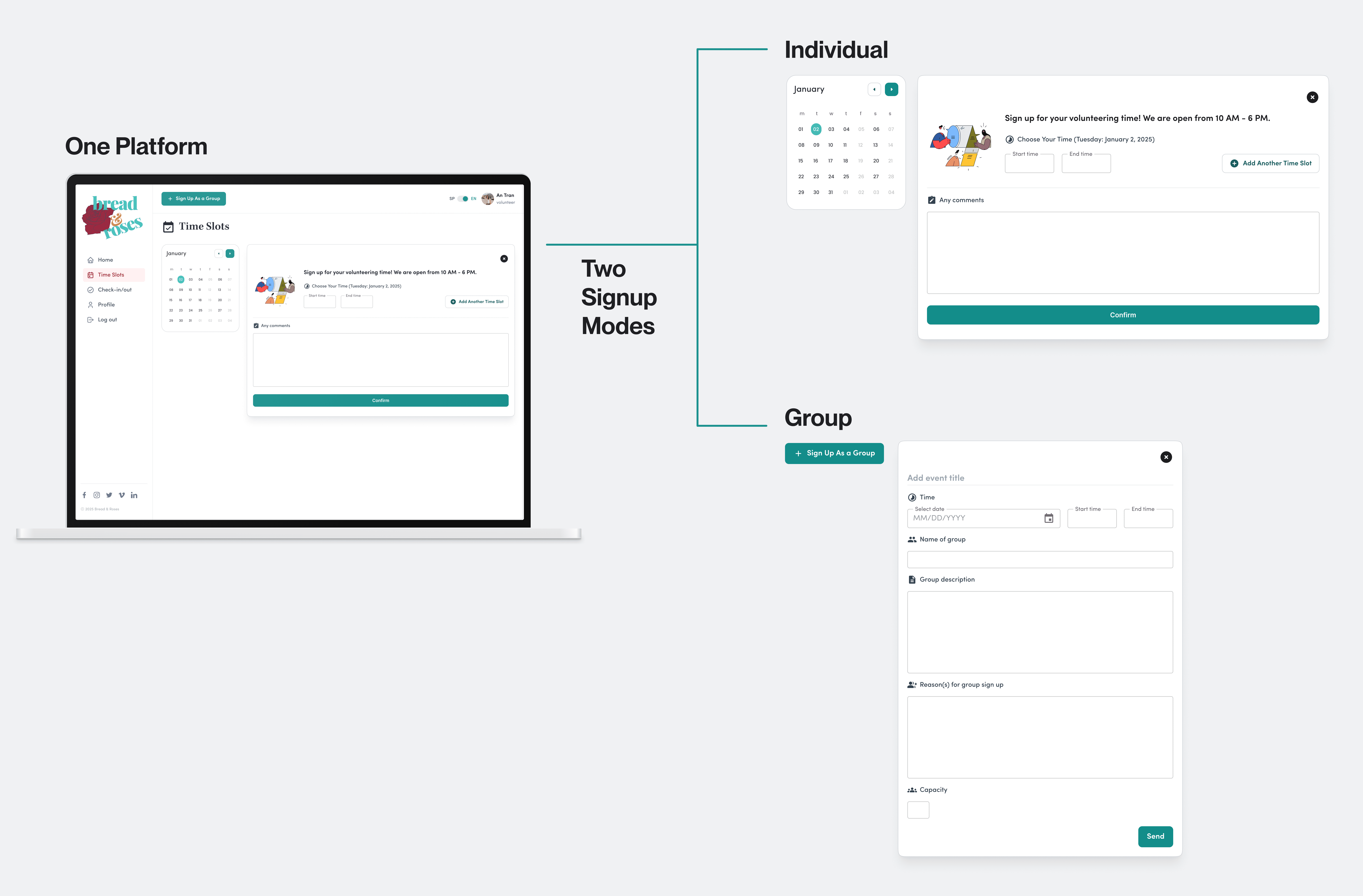
Why separating Individual vs. Group Signups?
Stakeholder interviews revealed that Bread & Roses served two very different audiences: individual volunteers and corporate groups of up to 100 people.
At first, a single sign-up form seemed like the simplest solution. However, requiring every group member to register individually created extra work for staff, who had to manually coordinate communications, waivers, and attendance.
Instead of designing one form for everyone, I redesigned the experience around how people actually volunteer. I created separate Individual and Group sign-up flows, making it easier for individuals to sign up, reducing administrative work for staff, and giving the organization better visibility into group participation and corporate partnerships..
Why separating Individual vs. Group Signups?
Stakeholder interviews revealed that Bread & Roses served two very different audiences: individual volunteers and corporate groups of up to 100 people.
At first, a single sign-up form seemed like the simplest solution. However, requiring every group member to register individually created extra work for staff, who had to manually coordinate communications, waivers, and attendance.
Instead of designing one form for everyone, I redesigned the experience around how people actually volunteer. I created separate Individual and Group sign-up flows, making it easier for individuals to sign up, reducing administrative work for staff, and giving the organization better visibility into group participation and corporate partnerships..
Why separating Individual vs. Group Signups?
Stakeholder interviews revealed that Bread & Roses served two very different audiences: individual volunteers and corporate groups of up to 100 people.
At first, a single sign-up form seemed like the simplest solution. However, requiring every group member to register individually created extra work for staff, who had to manually coordinate communications, waivers, and attendance.
Instead of designing one form for everyone, I redesigned the experience around how people actually volunteer. I created separate Individual and Group sign-up flows, making it easier for individuals to sign up, reducing administrative work for staff, and giving the organization better visibility into group participation and corporate partnerships..
Design Solution 2
Automated Group Notification
Integrated with the Nodemailer API, administrators can send announcements and updates to hundreds of volunteers in a single action. The goals of this feature are:
👩🏻💼 For Staff
👩🏻💼 For Staff
👩🏻💼 For Staff
Reduce repetitive administrative work by eliminating manual, individual outreach.
👩🏻🌾 For Volunteers
👩🏻🌾 For Volunteers
👩🏻🌾 For Volunteers
Improve volunteer communication by ensuring timely, consistent updates before upcoming shifts.
Design Solution 3
Scalable Volunteer Database
Volunteer profiles are automatically categorized as individuals or groups during registration, creating a structured database that grows alongside the organization. A centralized system simplifies volunteer management, supports accurate hour tracking, and enables staff to coordinate an expanding volunteer network efficiently.
Large Card
Large Card

Compact Card
Compact Card

Table View (Chosen)
Table View (Chosen)

Think in System and Scalability
Collaboration with the dev team
As a solo designer, I initiated a new design system based on the current branding. I also designed for edge cases, such as empty states or mobile experience. This process heavily involved the engineers in the loop for feedback as well.

Design Systems

Edge Cases
What I would do next
Introduce an AI-assisted Chat Assistant
Introducing an AI-driven assistant designed to streamline volunteer onboarding, automate shift modifications, and eliminate repetitive administrative inquiry.
Prototype made with Figma Make
Key learnings
👨🏻💻 Connect with devs early and often
From the start, I regularly had dev validation discussions with my PM and Tech Lead, which proved incredibly fruitful in uncovering tech limitations that influenced my design decisions. I also maintained an open line of communication throughout the build to clarify any questions, which led to a smooth launch and a refined final product.
🧐 Let research challenge assumptions
Initial designs drew from familiar tools like Google Calendar, but stakeholder feedback and user testing revealed these patterns didn’t match volunteers’ real workflows. Pivoting away from these assumptions toward a more flexible approach ensured my solution actually reflected actual operational needs.
⚖️ Design for scales, even in small team
Although Bread & Roses is a small nonprofit, they manage a large and growing volunteer base. This pushed me to think about scale early, particularly when designing admin-facing views and data management tools.

Unifying Fragmented Operations Management for 7 Staff and 50,000+ Volunteers
Unifying Fragmented Operations Management for 7 Staff and 50,000+ Volunteers
Unifying Fragmented Operations Management for 7 Staff and 50,000+ Volunteers
Overview
Client
Client
Bread & Roses Nonprofit
Timeline
Timeline
5 months
Role
Role
Solo Product Designer
Skills
Skills
Interaction Design, Visual Design, UX Research, Systems Thinking, Design Systems
Team
Team
1 Project Manager, 1 Tech Lead, 10 Developers
Problem
Bread & Roses serves over 10,000 households every year, yet volunteer operations still heavily relied on spreadsheets, emails, and manual coordination. As volunteer demand grew, administrative work became the bottleneck and unable to scale accordingly.
Solution
I designed a 0→1 operations platform that helped Bread & Roses coordinate volunteers, attendance, communication, and reporting from a single system. Shipped and launched since 2025.
Problem
Bread & Roses serves over 10,000 households every year, yet volunteer operations still heavily relied on spreadsheets, emails, and manual coordination. As volunteer demand grew, administrative work became the bottleneck and unable to scale accordingly.
Solution
I designed a 0→1 operations platform that helped Bread & Roses coordinate volunteers, attendance, communication, and reporting from a single system. Shipped and launched since 2025.
Problem
Bread & Roses serves over 10,000 households every year, yet volunteer operations still heavily relied on spreadsheets, emails, and manual coordination. As volunteer demand grew, administrative work became the bottleneck and unable to scale accordingly.
Solution
I designed a 0→1 operations platform that helped Bread & Roses coordinate volunteers, attendance, communication, and reporting from a single system. Shipped and launched since 2025.
Business Impacts
Since launched, the design had helped the organization …
+25%
Increase in volunteer application
+25%
Increase in volunteer application
-40%
Reduction in manual scheduling time
-40%
Reduction in manual scheduling time
~$50K
Recovery in Productivity (~1 hr/day saved per staff)
~$50K
Recovery in Productivity (~1 hr/day saved per staff)
Research and Insights
I conducted research with 5 Bread & Roses staff members and 40+ volunteers to understand both operational needs and volunteer experiences.
The methods and goals of my research are:
Staff interviews (n = 5): Understand current scheduling workflows, business constraints, coordination challenges, and organizational goals.
Volunteer surveys (40+): Identify pain points in the volunteer experience, validate interest in a centralized platform, and understand motivations and barriers to participation.
I conducted research with 5 Bread & Roses staff members and 40+ volunteers to understand both operational needs and volunteer experiences.
The methods and goals of my research are:
Staff interviews (n = 5): Understand current scheduling workflows, business constraints, coordination challenges, and organizational goals.
Volunteer surveys (40+): Identify pain points in the volunteer experience, validate interest in a centralized platform, and understand motivations and barriers to participation.
Design Statement
How might we build an integrated operations platform that reduces staff administrative overhead while giving volunteers autonomous, flexible control over scheduling?
Mapping Real-Life Workflow From Research
Design Goal
In short, Bread & Roses needs a platform that is both …
Efficient
Efficient
Efficient
Minimizing administrative work through streamlined scheduling and communication workflows.
Accessible
Accessible
Accessible
Enabling volunteers to quickly discover, sign up for, and manage shifts independently.
Final Product
A Multi-System Design
After multiple rounds of testing with staff and volunteers, the final scheduling platform was delivered and continues to evolve. Feedback informed every iteration - from simplifying volunteer sign-ups to streamlining scheduling workflows. The solution addressed the organization's immediate operational challenges while providing a scalable foundation that can grow alongside its volunteer community.
Key Design Challenge
How might we give volunteer autonomy in time slot sign-ups?
Volunteers have limited control over selecting shifts, requiring staff to manually assign schedules and manage back-and-forth coordination. Designing a system that increases volunteer flexibility while reducing staff workload became a key UX challenge.
Design Solution 1
Giving volunteers control over scheduling
Volunteers can browse and reserve available shifts that fit their schedules without contacting staff. By replacing back-and-forth emails and phone calls with self-service scheduling, the system reduces administrative overhead while increasing sign-up flexibility.
Individual Signups
Group Signups
Navigating Tradeoffs
During ideation, we considered a full Google Calendar-style scheduling system (option 1), since it matched the current system used by the staff.
However, the engineering team raised concerns around development complexity. Therefore, I prioritized a hybrid calendar-card experience that delivered the key user benefit (time-based visibility) (option 2) with significantly lower implementation effort.
Early Explorations
The Pivot
However, after early user testing, I found that an event-based selection experience did not match how volunteering actually works.
I initially explored event-based scheduling, but user testing revealed that volunteers cared more about reserving recurring time slots than specific event types. After discussing feasibility with engineering, we kept the existing layout while redesigning the sign-up flow around time slots.
Product Thinking
Why separating Individual vs. Group Signups?
Stakeholder interviews revealed that Bread & Roses served two very different audiences: individual volunteers and corporate groups of up to 100 people.
At first, a single sign-up form seemed like the simplest solution. However, requiring every group member to register individually created extra work for staff, who had to manually coordinate communications, waivers, and attendance.
Instead of designing one form for everyone, I redesigned the experience around how people actually volunteer. I created separate Individual and Group sign-up flows, making it easier for individuals to sign up, reducing administrative work for staff, and giving the organization better visibility into group participation and corporate partnerships..
Why separating Individual vs. Group Signups?
Stakeholder interviews revealed that Bread & Roses served two very different audiences: individual volunteers and corporate groups of up to 100 people.
At first, a single sign-up form seemed like the simplest solution. However, requiring every group member to register individually created extra work for staff, who had to manually coordinate communications, waivers, and attendance.
Instead of designing one form for everyone, I redesigned the experience around how people actually volunteer. I created separate Individual and Group sign-up flows, making it easier for individuals to sign up, reducing administrative work for staff, and giving the organization better visibility into group participation and corporate partnerships..
Why separating Individual vs. Group Signups?
Stakeholder interviews revealed that Bread & Roses served two very different audiences: individual volunteers and corporate groups of up to 100 people.
At first, a single sign-up form seemed like the simplest solution. However, requiring every group member to register individually created extra work for staff, who had to manually coordinate communications, waivers, and attendance.
Instead of designing one form for everyone, I redesigned the experience around how people actually volunteer. I created separate Individual and Group sign-up flows, making it easier for individuals to sign up, reducing administrative work for staff, and giving the organization better visibility into group participation and corporate partnerships..
Design Solution 2
Automated Group Notification
Integrated with the Nodemailer API, administrators can send announcements and updates to hundreds of volunteers in a single action. The goals of this feature are:
👩🏻💼 For Staff
👩🏻💼 For Staff
👩🏻💼 For Staff
Reduce repetitive administrative work by eliminating manual, individual outreach.
👩🏻🌾 For Volunteers
👩🏻🌾 For Volunteers
👩🏻🌾 For Volunteers
Improve volunteer communication by ensuring timely, consistent updates before upcoming shifts.
Design Solution 3
Scalable Volunteer Database
Volunteer profiles are automatically categorized as individuals or groups during registration, creating a structured database that grows alongside the organization. A centralized system simplifies volunteer management, supports accurate hour tracking, and enables staff to coordinate an expanding volunteer network efficiently.
Large Card
Large Card
Compact Card
Compact Card
Table View (Chosen)
Table View (Chosen)
Think in System and Scalability
Collaboration with the dev team
As a solo designer, I initiated a new design system based on the current branding. I also designed for edge cases, such as empty states or mobile experience. This process heavily involved the engineers in the loop for feedback as well.
Design Systems
Edge Cases
What I would do next
Introduce an AI-assisted Chat Assistant
Introducing an AI-driven assistant designed to streamline volunteer onboarding, automate shift modifications, and eliminate repetitive administrative inquiry.
Prototype made with Figma Make
Key learnings
👨🏻💻 Connect with devs early and often
From the start, I regularly had dev validation discussions with my PM and Tech Lead, which proved incredibly fruitful in uncovering tech limitations that influenced my design decisions. I also maintained an open line of communication throughout the build to clarify any questions, which led to a smooth launch and a refined final product.
🧐 Let research challenge assumptions
Initial designs drew from familiar tools like Google Calendar, but stakeholder feedback and user testing revealed these patterns didn’t match volunteers’ real workflows. Pivoting away from these assumptions toward a more flexible approach ensured my solution actually reflected actual operational needs.
⚖️ Design for scales, even in small team
Although Bread & Roses is a small nonprofit, they manage a large and growing volunteer base. This pushed me to think about scale early, particularly when designing admin-facing views and data management tools.